IGNOU Assignment Cover Page & Front Page Guide – Before writing and preparing your assignments, students enrolled in any academic program of IGNOU should read the assignment instructions carefully to avoid rejection or delays. If your marks don’t reflect after evaluation, verify submission details and then check your IGNOU Grade Card for updates.
It is mandatory for IGNOU students to attach the assignment front page before each assignment solution that will help the evaluator to get to know about your program, subject, and other important information of student. Failing to do so may be subject to the cancellation of the submitted assignment or non-updation of status and marks online.
In this guide, you’ll get:
-
The exact details to write on the cover page
-
A front page PDF template (print & fill)
-
A filled sample (so you don’t make mistakes)
-
Updated format + submission tips that students often miss
You Can Also Read:
What is the IGNOU assignment front page?
The IGNOU assignment front page (cover page) is the first sheet attached to your assignment. It contains your student and course details so your assignment is mapped correctly during evaluation. It is compulsory to make the front page of each subject’s assignment so that evaluators can easily understand and know about the details of the submitted assignment.
Important: In most cases, you must create/attach a separate cover page for each course (each course code). Don’t combine multiple courses under one cover page.
What to write on the IGNOU assignment front page (checklist)
At the time of writing your assignments or after completion of assignments, candidates are confused that what to write on the first page of their IGNOU Assignment so here is a solution to all your queries. We have made a list of all required details and information to be written on the cover page of your assignment solution. Each and every detail is given in the following list is compulsory to write on the page.
- Programme Full Name
- Course Code
- Course Title
- Assignment Code
- Study Centre
- Session Month & Year
- Mobile Number
- Enrollment Number
- Student Name
- Residence Address
- Signature
- Date
Demo Image for the IGNOU Assignment Front Page
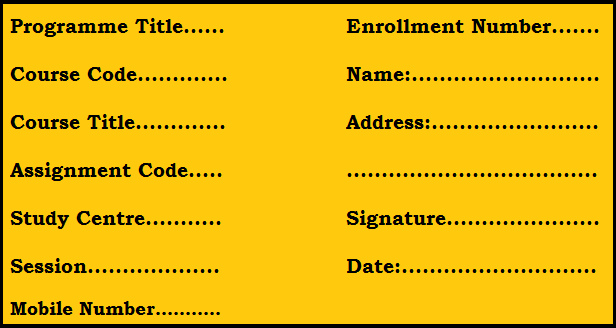
IGNOU Assignment Front Page PDF
If you want to download the readymade print format of the IGNOU Assignment Cover page then you can download the same from the given link. You just need to take a printout using a printer and write all the required information on it before submission of the IGNOU Assignment.
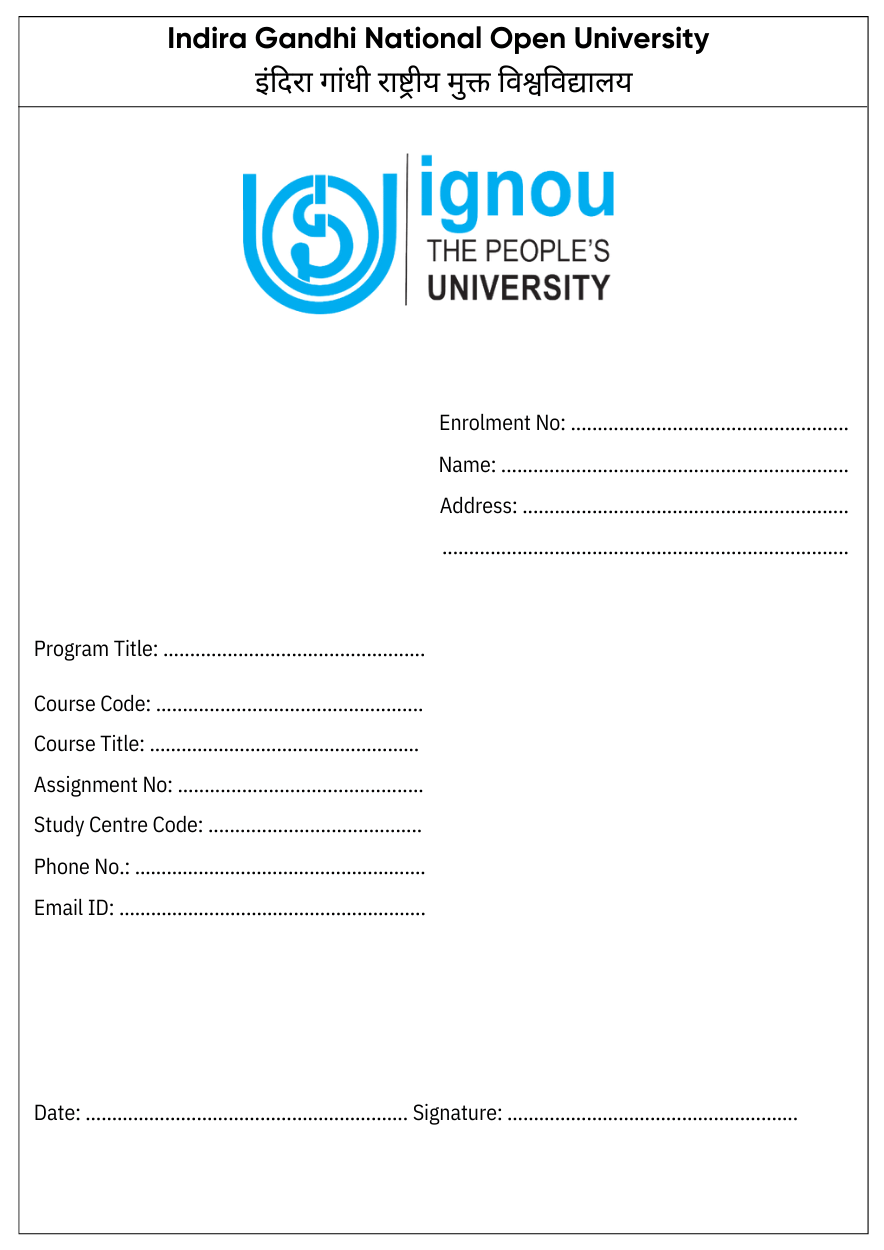
Click To Download IGNOU Assignment Front Page PDF
You have to attach this PDF file while submitting your online assignment to IGNOU and keep in mind that you have to do the same for all your subjects.
IGNOU Assignment Front Page Filled
If you want to know How to Fill IGNOU Assignment Front Page then we have attached a filled IGNOU Assignment Front Page that will help you to fill your front page. Furthermore, it will help you to know how it should should like after filling.
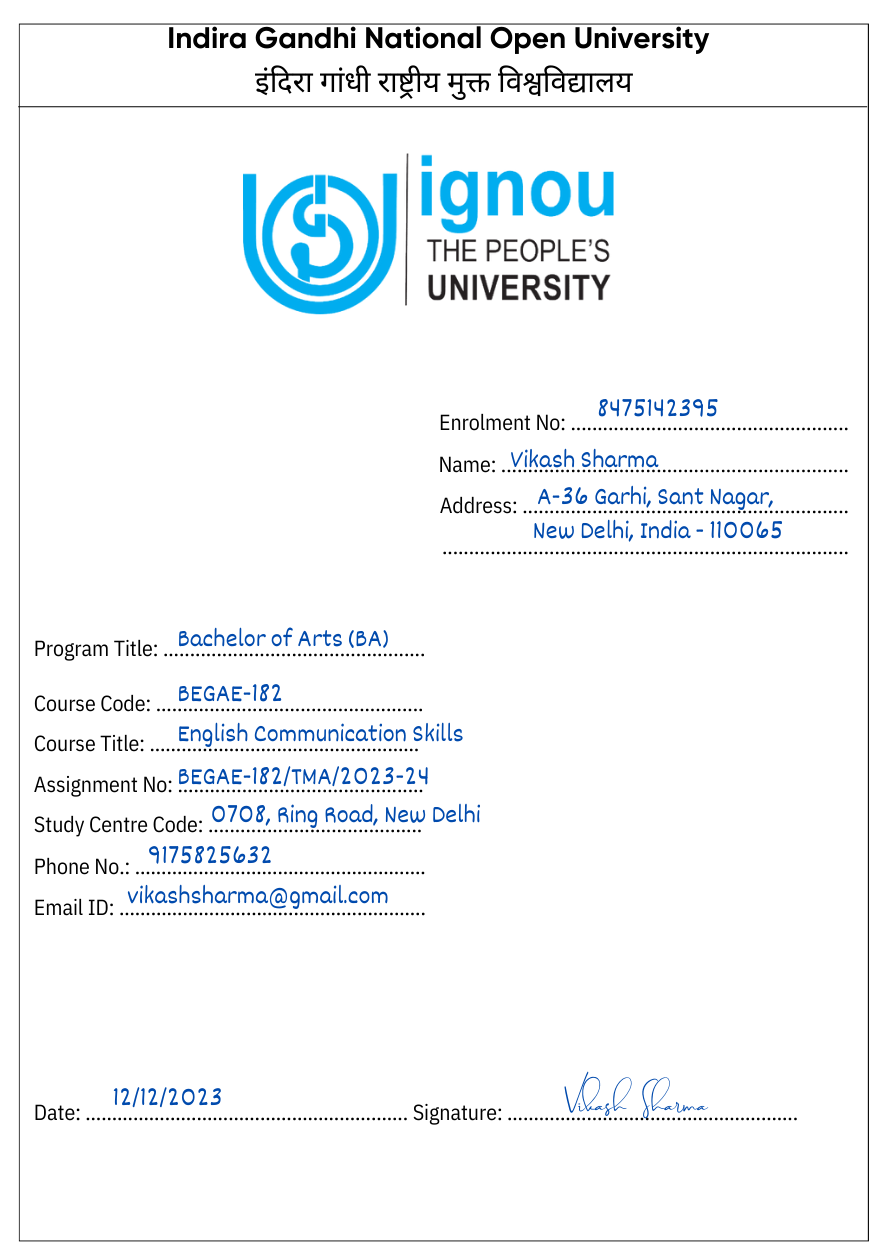
Click To Download IGNOU Assignment Front Page PDF
Step-by-step rules to prepare IGNOU assignments (handwritten + format)
Candidates are requested to read each point carefully to prevent them from making mistakes while writing the assignment of IGNOU. We have created the instructions point wise so that you can read and understand them easily.
-
Use A4 pages (ruled is usually safest).
-
Use black or blue pen only. Avoid red ink for answers.
-
Keep clean margins and readable spacing.
-
Write the question number clearly before each answer.
-
Number all pages (Page 1, Page 2…).
-
Write your enrolment number + name at the bottom of pages if your centre recommends it.
-
Keep each course assignment separate (don’t mix course codes).
-
Submit handwritten assignments (typed/printed answers are commonly not accepted in many programmes).
-
Avoid copying from other students/blocks—copied content can be marked zero or rejected.
-
Bind/staple neatly so pages don’t get lost.
-
Keep a photocopy/scanned backup for safety.
-
Collect and keep your submission receipt until marks reflect in your grade card/status.
That’s It.
Also Read: How To Submit IGNOU Assignment Online?
We hope that the above points will be helpful for those students who are confused or have no idea that what to write on the 1st page and what instructions need to follow to successfully submit the assignments to IGNOU. We are sure that you got your solution from here after reading this article.
We request to all our candidates that please read and refer to every point given above and send your proper IGNOU Assignment solution so that it easily accepted and approved by the university and you can get a permit to appear in your TEE Examination.
Without writing assignments and submissions, no candidates will be permitted to attend any of the examinations conducted by IGNOU. Even students are not eligible to fill their IGNOU Exam Form of any session if they fail to submit their required assignments to the university before the last date of the submission deadline.
Common mistakes that cause rejection or delays
-
Wrong course code or missing session
-
Missing enrolment number on cover page
-
Using one cover page for multiple courses
-
Submitting pages loose (not stapled/bound)
-
Uploading one combined PDF for many courses when separate files are required
-
Not keeping the submission receipt (hard to prove later)
IGNOU Assignment Front Page: FAQs
Q1) Is the IGNOU assignment front page/cover page compulsory?
Yes. You must include the required student and course details on the first page of every assignment submission. Many IGNOU assignment instructions expect these details on the first page of the response sheet, and several Regional Centres also require a separate top sheet/cover page format.
Q2) Is the cover page a separate sheet or the first page of the answer sheet?
It depends on your Study Centre/Regional Centre instructions. In many cases, the first page of your handwritten answer sheet works as the “front page” if it contains all required details. Some Regional Centres also ask you to attach a separate top sheet/cover page before your answers.
Q3) What details should be written on the front page?
Usually, you should write:
-
Student name
-
Enrolment number
-
Programme code/name
-
Course code
-
Course title
-
Assignment number/code (if provided)
-
Study centre code/name
-
Session (June/December and year, or as printed on your assignment)
-
Mobile number (and email if asked)
-
Date and signature
Q4) Do I need a separate front page for each subject/course?
Yes. In most cases, you should prepare and submit each course assignment separately, with its own front page/top sheet. Do not combine multiple course codes under one cover page.
Q5) Are typed or printed assignments accepted?
In many programmes and at many centres, typed/printed assignments are not accepted and assignments must be handwritten. If your Regional Centre allows online submission, they typically require scanned PDFs of handwritten answers. Always follow your programme/centre instructions.
Q6) What paper size should I use: A4 or foolscap?
This varies by programme and Regional Centre. Some instructions specify A4, while others mention foolscap. Use the paper size mentioned in your assignment booklet or centre notice. If nothing is specified, A4 ruled sheets are usually the safest.
Q7) Should I write my details only on the front page?
Best practice is to write at least your enrolment number and course code on every page (top or bottom), and number all pages. This reduces the risk of pages getting mixed up during evaluation.
Q8) Should I staple/file the pages? Are plastic files allowed?
You should keep pages properly arranged and securely attached (stapled or tied as your centre prefers). Some centres discourage plastic covers/files. Follow your centre’s submission rules and keep the set neat and secure.
Q9) What should I attach along with the assignment?
This depends on your centre. Some centres ask for additional documents such as an ID card copy or registration details. If your centre does not specify anything extra, submit at least the complete assignment set with a proper front page for each course.
Q10) Where do I submit the assignments: Study Centre or Regional Centre?
Usually, assignments are submitted to your allotted Study Centre, but submission instructions can vary. Some Regional Centres provide online submission systems or specific directions for their jurisdiction. Always follow the latest notice from your centre.
Q11) Can I submit IGNOU assignments online?
Only if your Regional Centre/Study Centre provides an online submission method for your programme/session. When online submission is permitted, you may be required to upload separate PDFs for each course and follow specific file naming rules.
Q12) How can I confirm my assignment was received or updated?
Keep your submission receipt/acknowledgement (offline or online). If the status or marks do not update after evaluation, you’ll need this proof to raise a query with your Study Centre/Regional Centre.
Q13) When will assignment marks appear on the Grade Card?
After your assignment is evaluated and processed, marks are updated on the Grade Card. The timeline varies by programme, study centre workload, and session, so updates may take time even after submission.
In a lockdown 2020 and 2021 assignments the A4 size paper is not available so we can prepare it on a register pages …bcoz of assignment submission last date …so the assgnments should be upadated or not. ??
I m also enrolled in march 2021 in m. Com i have same doubt plzz let me know too and can i use single side ruled page (A4).
since my medium is hindi, can i write assignment in english?
MCA_NEW
Anyone ?
Kya hm front page apne hand written use kr skte hai.
yes u can use .It is not hard and fast to use printed cover page.
what is the last date for July 2020 B.com session for submit their assignments ?
Can we use colour type pen in headlines
Yes ,for highlighting u can use.
I enrolled for B.A. ,do i also have to make assignments? please reply as soon as possible
I enrolled for m. com first year 2021 can you tell me is this assignment is same for the candidates who enrolled 2021 session in feb.
Assignment last date kab hein for july 2020 candidates, date extend hoga.
30th April, 2021 is the last submission date for July 2020 session.
Can anyone plz give me the contact number of study centre in panvel , Mumbai…
Actually I am planning to take admission in Msc environmental science from ignou but I couldn’t contact them by anyways…
Plz help..
Is there anyone for BA Economics Honours
Hello, anyone for MAPC course?
Is there anyone whose study center code is 1070 ( UCHANA HARYANA) . Regarding BA exams for june 2020 session.
which is the last date of examination form and fee 2020 july session admission (maeducation)
Mein practical ruled page mein assignment likhi hu mhd second year is there any problem
Bapch ( ba psychology hons)
I don’t have any assignments nor its available online can you please provide all the assignment 1st year
My study center 0511
Name of program PGDRD
Assignment question plz provide me.
I m doing MSW 1st year june 2020 batch chennai…can we submit assignment through online or is it compulsory to submit assignment in study center.
Is there any change for extending assignment date from march 31st
Please tell where we have to submit the assignment of July 2020..which website please tell..
Can i do only 5 question in assignment?
How many pages should be written for one single question? Can I use both the sides of a paper. I have only A4 unruled paper. Is it ok?
I can use pencil colour to decorate the assignment.
No we are supposed to use only black and blue pen
Mera enrollment no gum ho gya please help me
I submitted assignment in January through Google form…when will marks update??
On which day can I submit the assignment?And what time?
may be on 10th April
Sir… MA English.. Assignments question k solution mil skte hain kyaa…..please tell me because every question contains 20 marks…. So i need help to answer all the questions properly.😇
Hi, Good afternoon.
I enrolled for July 2020, Mcom and have received a mail regarding my counselling sessions which states that the assignment needs to be submitted by 30th April, however on assignments it says 15th march and you are saying 31st march.
Can we have more clarity on this to avoid confusion?
Thanks,
Muskan
sir assignment mai to july session 2020 walo ka last date 30 april dika raha hai
I m enrolled in pgdrd course . Last date for my assignment submission is 31st march 2021. Can I write my assignment on blank A4 size paper ? Please reply .
it is clearly mentioned in point – 3 to use ruled instead of blank.So better follow the instructions.
Answer to book se e bnega. Ye copy krna kaise hota h.to read khan se kre knowledge k liye e di h na books.
online assignment solution sai download krlo ya fir TELEGRAM group join karlo. AApko kis subject and course ki assignment banani hai.
I have enrolled in MA English January 2021 session from where can I get the assignment.
I am doing MA Philisophy. Anyone with me ?
yes, I’m
Yes
What is “Session month and year” on assignment front-page ? Is it to write our admission month and year or assignment deadline month and year or assignment submitting month and year? Please help me out
what they will do knowing your deadline date and month , obviously you have to write your admission session month and year
But assignment are required to send soft copy .right??
hard copy only
Sir main first year m hun .mujhe assignment k bare m kuch pta nhi h toh details m bta dijye kaise krna h.
All july 2020 batch students have to submit their assignment by march 15 ? All 6 assignments have to be submitted together? when will we get exam datesheet? Will we not get any information from ignou about exams and assignments?
MENTIONED IN POINT 13- PLASTIC FILE WILL NOT BE ACCEPTED! THEN WHAT TYPE OF FILE WE CAN USE PLEASE LET US KNOW. THANK YOU
no need to use any file just stepler the pages.
agar feb me exam nahi diye to kab ho skta he exam 2021?
Kindly sent this guideline to my mail for my son subroto dey
2021 fresh batch……
BA sociology assignment topics
My study centre code is 29019
In which email I will send my assignment s
extended date of submission is when and examination form how to go about it.
Wait as new portal is coming sor submission of assignment for all study center.
i enrolled for MA Education in July 2020 session. i was not contacted by the study centre nor any information passed on. now today i found out about the last date submission of assignment as 31 january 2021 for December TEE. now i am confused. how to go about it and what to do. can IGNOU help centre please advise. I email at ignou csrc@ignou.ac.in also but no response. can someone please guide me
If your admission date is july 2020,then your assignment submission date is before 31 march 2021.
yes there is know any proper helpline contact number for student so that they can solve their queries. Very poor service and even they did not answere the phone calls.
can we write assignments in both sides of the paper? or only one side?
कृपया मुझे ये बताओ की front page colour चाहिए या black n white चलेगा??
Black & white chalega
Black and white chalega
Is leaving the lines after answers is compulsory??? Please answer
YES because through the line a teacher can easily evaluate another question.
Can I write the assignments in an unruled a4 size paper ??
Can we write assignment in register instead of A4 size sheet
I hope that should not be a problem and that should be acceptable.
Is it compulsory to write Name & enrollment no. On all the sheets. I’ve scanned and prepared the mails. Do I have to write the name & enrollment no. & scan them again ??
Please Revert ASAP 🔴
Assignment hum jama nahi kiye hai date 31 march tak thha to kiya exam se pahle hum assignment jama kar sakte hai please reply
Is it necessary to use two sided of fullscap or we can use one sided fullscap…???
Dono taraf likh sakti hai aap
Aap ignou se kounsa course kar rahi hai
Can For English all MEG assignments be done in one thick register?
Is the date of submission assignment extend from 31 march?
Till 30th April 2021
Most probably it will be extended .As new portal is made to submit assignment.
I dont think so! they’ve strictly asked us to use sheets
file kaisi honi chahiye
Ignou assignment m kya printed diagrams use kr skte in case we unable to draw that diagram
Printed diagram nai chalega.
My study centre code is 29019
In which email I will send my assignment s